Wow! MSDN for Microsoft Dynamics AX is getting better every day. This is terrific news!! I still remember the days, when all the information was extremely hard to find. It had its own charm though :)
Anyway, this topic is really not about MSDN. It is about lookup forms.
First of all, for the record: I (and the Best Practices document as well) recommend creating custom lookup forms in AOT instead of dynamically coding them in the overridden lookup methods on controls/datasource fields.
But, in reality, this is true only for lookup forms with very large complexity. I won't go into a discussion of why that is the way it is here. :)
Now, back to what I was planning to write about:
In order to build a lookup form from code, developers use the SysTableLookup class.
You can go to MSDN (mentioned above) to read a How-to article on creating a run-time lookup form, as well as take a quick look at the SysTableLookup method descriptions.
SysTableLookup class has evolved over the multiple releases, providing more and more flexibility and control to the application developers.
I would like to publish another extension to this class, SysMultiTableLookup, which I hope will prove useful to members of the AX community.
Short list of features:
- Backward compatible, should cover everything that is present in AX 2009 version of SysTableLookup class
- Allows including multiple tables into lookups with different join types
- Completely based on the Query that you build, no extra parameters (except for the control) are needed to initialize the class
- Allows adding aggregated fields to the lookup
- Displays fields based on Boolean Enum as check boxes
- Allows to specify alternative labels when adding fields to the lookup
You can download the project from axaptapedia.com.
It has (to some extent) been tested on Axapta 3.0 SP3, AX 4.0 and AX 2009.
Also included in the project is a tutorial form, showing 4 examples of dynamic lookups using the new class. After importing the project, make sure to try out the form, and use it for future reference for code examples and other inspiration.
Showing posts with label Extensions. Show all posts
Showing posts with label Extensions. Show all posts
Monday, September 22, 2008

Tuesday, August 12, 2008
Another useful Editor Script for developers
In AX the principle of upcasting is used quite a lot. Some examples coule be the RunBase hierarchy or the InventMovement class hierarchy. Basically, the base (or super) classes contain the main part of the hierarchy logic, while subclasses only override a couple of methods performing actions specific to this class.
When browsing the AOT, trying to find a specific line of code (debugging without the debugger, basically), you often find yourself in a situation when you lookup a definition of a method from a derived class, and end up in this method of the base class instead (because upcasting was used in the code in question). And every time you need to see the same implementation in the child class, you need to go back to the AOT and open it from there manually.
Well, not any more.
Here is a small editor script, that you can use to navigate to an overridden method of a derived class.
I created 2 versions of the same script, one using xReferences, the second using Dictionary class. The xRef one, generally, works faster once the xRefs for the class hierarchy is updated (happens the first time you use the script). So I am not posting the second script version. If anyone is interested in that version specifically, let me know and I will send you the code.
I made a couple of small changes to the script since my previous post (which I deleted), making it possible to import the script without compilation errors into AX prior to verion 2009. Sorry for that :)
You can copy-paste the code for the script from axaptapedia.com (There is a problem with copying over the code from blogger site directly)
You can read more about Editor Scripts and how to use them here
Enjoy, and get back to me with any comments or suggestions, posting them as comments or e-mailing me directly
When browsing the AOT, trying to find a specific line of code (debugging without the debugger, basically), you often find yourself in a situation when you lookup a definition of a method from a derived class, and end up in this method of the base class instead (because upcasting was used in the code in question). And every time you need to see the same implementation in the child class, you need to go back to the AOT and open it from there manually.
Well, not any more.
Here is a small editor script, that you can use to navigate to an overridden method of a derived class.
I created 2 versions of the same script, one using xReferences, the second using Dictionary class. The xRef one, generally, works faster once the xRefs for the class hierarchy is updated (happens the first time you use the script). So I am not posting the second script version. If anyone is interested in that version specifically, let me know and I will send you the code.
I made a couple of small changes to the script since my previous post (which I deleted), making it possible to import the script without compilation errors into AX prior to verion 2009. Sorry for that :)
You can copy-paste the code for the script from axaptapedia.com (There is a problem with copying over the code from blogger site directly)
You can read more about Editor Scripts and how to use them here
Enjoy, and get back to me with any comments or suggestions, posting them as comments or e-mailing me directly
Thursday, May 29, 2008
EditorScripts.addIns_OpenInAOT - version 2
A long time ago, I posted an editor script for opening objects selected in the editor in AOT (link to that post)
Yesterday, miklenew from AxForum posted an editor script for AX 3.0 that opens a new AOT window with the object currently selected in the Editor, that works a little differently and also allows to open objects based on variable type. You can view the original post here.
Today I modified this code, extending it a bit and adding support for Dynamics AX 4.0 and Dynamics AX 2009 (For version 3.0 use the code posted on AxForum).
As you can see, the code is very simple and utilizes the xReferences.
But the great thing about it is that updating the cross references is not required for this code to work, as it updates them on the fly for this specific AOT node.
I think this is a must have method for each application developer out there. :)
Yesterday, miklenew from AxForum posted an editor script for AX 3.0 that opens a new AOT window with the object currently selected in the Editor, that works a little differently and also allows to open objects based on variable type. You can view the original post here.
Today I modified this code, extending it a bit and adding support for Dynamics AX 4.0 and Dynamics AX 2009 (For version 3.0 use the code posted on AxForum).
public void addIns_OpenInAOT(Editor e)
{
    #AOT
    TreeNode            treeNode = TreeNode::findNode(e.path());
    xRefTmpReferences   xRefTmpReferences;
    Column              nCol = e.columnNo() + 1;
    Line                nLine = e.currentLineNo() + 1;
    ;
    treeNode.AOTmakeXref(1);
    xRefTmpReferences = xRefCreate::makeTmp(infolog.lastxRef());

    select firstonly xRefTmpReferences
        order by Column desc
        where xRefTmpReferences.line == nLine &&
              xRefTmpReferences.Column <= nCol;

    if (!xRefTmpReferences)
        return;

    treeNode = TreeNode::findNode(xRefTmpReferences.path());

    if (treeNode)
        treeNode.AOTnewWindow();
}
As you can see, the code is very simple and utilizes the xReferences.
But the great thing about it is that updating the cross references is not required for this code to work, as it updates them on the fly for this specific AOT node.
I think this is a must have method for each application developer out there. :)
Monday, April 28, 2008
SysFormEnumComboBox - class allowing to show only some of the values for a comboBox
In Microsoft Dynamics AX 2009, a new class has been created, that got my attention recently after yet another question about this sort of thing was asked by a fellow Dynamics AX developer.
Often enough, we need to restrict the user selection from a particular ComboBox. Creating a new BaseEnum specifically for this purpose is a really cumbersome solution, which later might lead to problems of maintenance.
Originally, the SysFormEnumComboBox was designed to be used on forms to provide for this behavior. I modified the class slightly to allow for usage in RunBase Framework classes.
To demonstrate, how this class can be used, I modified the tutorial_RunBaseForm class and form, showing both scenarios: adding the control from the dialog method of the class, as well as adding it manually in the form design and methods.
To use this class, you need to know only one static method:
And here is an example of how you would use it:
which means that the control ComboBoxOnForm will be bound to BaseEnum InventTransType, containing only values, found in the Set enumSet.
You can download the project for versions 4.0 and 2009 of Microsoft Dynamics AX through the following link:
download
P.S. It is also worth mentioning, that this class does not provide support for grids. It requires a stand-alone control, not bound to a database table field.
Often enough, we need to restrict the user selection from a particular ComboBox. Creating a new BaseEnum specifically for this purpose is a really cumbersome solution, which later might lead to problems of maintenance.
Originally, the SysFormEnumComboBox was designed to be used on forms to provide for this behavior. I modified the class slightly to allow for usage in RunBase Framework classes.
To demonstrate, how this class can be used, I modified the tutorial_RunBaseForm class and form, showing both scenarios: adding the control from the dialog method of the class, as well as adding it manually in the form design and methods.
To use this class, you need to know only one static method:
public static SysFormEnumComboBox newParameters(
    FormRun _formRun,
    int     _comboBoxControlId,
    enumId  _enumId,
    Set     _allowedEnumValuesSet,
    Form    _form = null)
And here is an example of how you would use it:
sysFormEnumComboBox = SysFormEnumComboBox::newParameters(element,
    control::ComboBoxOnForm,
    enumnum(InventTransType),
    enumSet);
which means that the control ComboBoxOnForm will be bound to BaseEnum InventTransType, containing only values, found in the Set enumSet.
You can download the project for versions 4.0 and 2009 of Microsoft Dynamics AX through the following link:
download
P.S. It is also worth mentioning, that this class does not provide support for grids. It requires a stand-alone control, not bound to a database table field.
Friday, September 14, 2007
DEV_SysTableBrowser version 2.0 is out!
I have been asked by a number of my blog readers to move this tool to Dynamics AX 3.0, so here is the updated version of this tool. Now it works on both DAX 3.0 and 4.0 (tested on 3.0 SP5 KR2 and 4.0 SP1 and SP2).
Also, I added a couple of things I considered useful to this new release:
- The user field select dialog option has now, by default, all the non-system fields selected, so that users don’t get surprised when no fields are selected. I agree – it does look strange :)
- Now it’s possible to select display methods along with table fields in the user field select dialog. This feature was already working with FieldGroups, so I decided it could be a nice add-on to the User Field List option
- I also fixed a couple of old (and new, brought to us by 4.0 SP2) bugs that existed in the tool
- After reading some of the last posts on AxForum, I decided to add the ability of browsing temporary tables into my project as well, so that others may use them if they want :) (this will also include browsing temp tables data shown in forms from Tabax when the next version comes out)
- Now you can also use the browser for debugging purposes, launching it from code (this works for temp tables as well). Just write:
SysTableBrowser::browseTable(table.TableId, table);
where table is a cursor (second parameter can be omitted for non-temp tables). In this case the browser will open and code execution will stop until you close the browser (if not in a transaction). Third parameter controls if code execution should be stopped.
- There are two variables in method new of class SysTableBrowser
saveQueryRun = true; // Enables/Disables queryRun saving when new options are specified
savePosition = true; // Enables/Disables cursor position saving when new options are specified
The options allow to save the user filters and cursor position when changing setup options.
Both operations could result in performance problems on large tables.
If that happens (or you just don't need them), just turn them to false. :)
The download link is: DOWNLOAD
See extended installation instructions and tool description on: HOMEPAGE
What was a little disappointing is that a number of bugs I wrote about earlier were not fixed since SP1. Here are the 2 I mentioned before, again:
- UPDATE_RECORDSET command, when used in the table browser, crashes DAX.
- The left top edge position (the coordinates) of the table browser gets reset when any of the options are changed. I fixed this by specifying 0 instead of -1 for the leftMode and topMode properties of the design. So when you download this tool, the browser will stay in one place, which is nice ;)
Also, 1 new bug I found is for the Russian localization team.
- Changing the view (in the Unmodified version of the browser was causing the full table list to open, prompting the user for a selection of the table). This is caused by a small validation in the SysTableBrowser::main() method. SysSetupFormRun is supposed to be the classId of the calling object. And it is not, because some system wide changes were made to the SysSetupFormRun::construct() method. Anyway, I fixed this small bug as well.
OK. That’s all about the tool and the bugs. I have also been asked by a couple of my readers to write a tutorial on using the SysListPanel class.
That’s exactly what I am going to write about in my next blog entry. After all, there is a new class extending from the SysListPanel class in the DEV_SysTableBrowser project.
Also, I added a couple of things I considered useful to this new release:
- The user field select dialog option has now, by default, all the non-system fields selected, so that users don’t get surprised when no fields are selected. I agree – it does look strange :)
- Now it’s possible to select display methods along with table fields in the user field select dialog. This feature was already working with FieldGroups, so I decided it could be a nice add-on to the User Field List option
- I also fixed a couple of old (and new, brought to us by 4.0 SP2) bugs that existed in the tool
- After reading some of the last posts on AxForum, I decided to add the ability of browsing temporary tables into my project as well, so that others may use them if they want :) (this will also include browsing temp tables data shown in forms from Tabax when the next version comes out)
- Now you can also use the browser for debugging purposes, launching it from code (this works for temp tables as well). Just write:
SysTableBrowser::browseTable(table.TableId, table);
where table is a cursor (second parameter can be omitted for non-temp tables). In this case the browser will open and code execution will stop until you close the browser (if not in a transaction). Third parameter controls if code execution should be stopped.
- There are two variables in method new of class SysTableBrowser
saveQueryRun = true; // Enables/Disables queryRun saving when new options are specified
savePosition = true; // Enables/Disables cursor position saving when new options are specified
The options allow to save the user filters and cursor position when changing setup options.
Both operations could result in performance problems on large tables.
If that happens (or you just don't need them), just turn them to false. :)
The download link is: DOWNLOAD
See extended installation instructions and tool description on: HOMEPAGE
What was a little disappointing is that a number of bugs I wrote about earlier were not fixed since SP1. Here are the 2 I mentioned before, again:
- UPDATE_RECORDSET command, when used in the table browser, crashes DAX.
- The left top edge position (the coordinates) of the table browser gets reset when any of the options are changed. I fixed this by specifying 0 instead of -1 for the leftMode and topMode properties of the design. So when you download this tool, the browser will stay in one place, which is nice ;)
Also, 1 new bug I found is for the Russian localization team.
- Changing the view (in the Unmodified version of the browser was causing the full table list to open, prompting the user for a selection of the table). This is caused by a small validation in the SysTableBrowser::main() method. SysSetupFormRun is supposed to be the classId of the calling object. And it is not, because some system wide changes were made to the SysSetupFormRun::construct() method. Anyway, I fixed this small bug as well.
OK. That’s all about the tool and the bugs. I have also been asked by a couple of my readers to write a tutorial on using the SysListPanel class.
That’s exactly what I am going to write about in my next blog entry. After all, there is a new class extending from the SysListPanel class in the DEV_SysTableBrowser project.
Monday, September 3, 2007
DEV_CreateNewProject tool version 2.0.0
Hello, everyone.
I finally got down to moving the latest version of this tool to Dynamics AX 4.0.
Now there is only one project for both versions (3.0 and 4.0)
If you haven't seen this project before, you are welcome to visit the homepage, which contains a description of the features, screenshots, installation instructions and more.
The download link with the new project is:
DEV_CreateNewProject version 2.0.0
Important:
The project was renamed to fit the naming conventions of Dynamics AX. The new name is DEV_CreateNewProject.
(If you want, you can remove the previous version (AxCreateNewProject)).
Leaving them in your application WILL NOT have unwanted effects on your system
Also, I would like to share some knowledge that came upon me today with you.
This might not seem strange to you, but it sure was a surprise for me.
While testing the new version in Dynamics AX 4.0 SP2, I noticed that the form size and position are not saved when I press OK in it.
I dug deeper into system classes and found one extra condition that was added before any data for the form is saved.
The extra condition is:
The AllowUserSetup property on form design must be Restricted or Yes.
So you should keep this in mind when developing forms in the future.
Well, have a great day, all of you.
And do try out the new DEV_CreateNewProject version.
I finally got down to moving the latest version of this tool to Dynamics AX 4.0.
Now there is only one project for both versions (3.0 and 4.0)
If you haven't seen this project before, you are welcome to visit the homepage, which contains a description of the features, screenshots, installation instructions and more.
The download link with the new project is:
DEV_CreateNewProject version 2.0.0
Important:
The project was renamed to fit the naming conventions of Dynamics AX. The new name is DEV_CreateNewProject.
(If you want, you can remove the previous version (AxCreateNewProject)).
Leaving them in your application WILL NOT have unwanted effects on your system
Also, I would like to share some knowledge that came upon me today with you.
This might not seem strange to you, but it sure was a surprise for me.
While testing the new version in Dynamics AX 4.0 SP2, I noticed that the form size and position are not saved when I press OK in it.
I dug deeper into system classes and found one extra condition that was added before any data for the form is saved.
The extra condition is:
The AllowUserSetup property on form design must be Restricted or Yes.
So you should keep this in mind when developing forms in the future.
Well, have a great day, all of you.
And do try out the new DEV_CreateNewProject version.
Wednesday, June 27, 2007
Tabax plugins' update - RecentWindows, RecentProjects
After developing 3 great tabax plugins I was feeling a little unsatisfied, because I wanted to add images to the popup menues.
AndyD has developed a class that allows me to do this now.
The project containing the class with the images is "shipped" separately. Depending on where you want to see images in your popups menues or not, you will be able to import it separately if you do.
Download:
You can use the following links to download the projects (version 0.1.1) and the MenuImages class.
RecentProjects v. 0.1.1 -download
RecentWindows v. 0.1.1 - download
Class MenuImages - download
Alternatively you can download them from their homepages on Axaptapedia.
RecentProject - homepage
RecentWindows - homepage
Screenshot: (RecentWindows)

AndyD has developed a class that allows me to do this now.
The project containing the class with the images is "shipped" separately. Depending on where you want to see images in your popups menues or not, you will be able to import it separately if you do.
Download:
You can use the following links to download the projects (version 0.1.1) and the MenuImages class.
RecentProjects v. 0.1.1 -download
RecentWindows v. 0.1.1 - download
Class MenuImages - download
Alternatively you can download them from their homepages on Axaptapedia.
RecentProject - homepage
RecentWindows - homepage
Screenshot: (RecentWindows)

Tuesday, June 26, 2007
AxPaint - make your DAX look cool :)
A couple of months ago I asked Alex Kotov from AxForum to modify a project he wrote for fun half a year ago or so. Today he sent me an e-mail with the project.
A short description of what the tool can do for you: :)
Basically, it just changes the backcolor of your DAX 3.0 (it does not work for DAX 4.0) installation.
You can choose a simple custom color you would like to use, or select an image from your hard drive to use as the background image.
you can select a couple of settings as well (ALL the settings are accessed by pressing Alt + S in DAX after launching the AxPaint form) - like stretching the image or using a 'transparent' background, showing your desktop (you have to set the image path to a specific location for that).
Nothing much, you'd say. But it sure is fun to work in DAX when a nice picture is seen in the background. :)
Installation instructions:
download
Custom code for the info.startupPost method:
if (curUserId() == 'ikash')
TreeNode::findNode("Forms\\AxPaint").AOTrun();
Link to the external WallChanger application:
download
Screenshots:
A short description of what the tool can do for you: :)
Basically, it just changes the backcolor of your DAX 3.0 (it does not work for DAX 4.0) installation.
You can choose a simple custom color you would like to use, or select an image from your hard drive to use as the background image.
you can select a couple of settings as well (ALL the settings are accessed by pressing Alt + S in DAX after launching the AxPaint form) - like stretching the image or using a 'transparent' background, showing your desktop (you have to set the image path to a specific location for that).
Nothing much, you'd say. But it sure is fun to work in DAX when a nice picture is seen in the background. :)
Installation instructions:
- Unzip the archived files.
- Place the .bat and .ocx files somewhere where you won't delete them accidently.
- Run the .bat file, which will register the .ocx
- Import the project into Dynamics AX - the project contains one form AxPaint.
- Run the form. It will automatically hide from view. Press Alt + S to run setup.
- The image path is setup to C:\Documents and Settings\%username%\Local Settings\Application Data\Microsoft\Wallpaper1.bmp - this is the path to the current wallpaper in Win XP (without active desktop)
- Show desktop (like Delphi) option is set in the setup dialog.
- In the startupPost method of the Info class the following lines are added:
- An external application is used to change the wallpaper on system startup. So every day I have a different look in my DAX :)
download
Custom code for the info.startupPost method:
if (curUserId() == 'ikash')
TreeNode::findNode("Forms\\AxPaint").AOTrun();
Link to the external WallChanger application:
download
Screenshots:


Monday, June 25, 2007
3 Dialog extensions
Performing one of the modifications on the project I am currently working on, I had to modify the behavior of one of the basic classes using the RunBase framework.
Anyway, what I needed to do was:
But the code was very highly customized, so it would be a hard job.
So I decided to go another way, using what I have on hand, and that is the Dialog class.
For that, I needed a couple of modifications to the Dialog class, as it does not allow any of the 3 features I neded.
But what any developer should clearly understand when using dialogs is - this is just another form. Simple as that - Dialog is just another AOT form. What this means is that with a dialog we can do all the things we can do with a form.
Also, which is very nice and I thank DAX Developers for that, RunBase framework uses DialogRunBase class for showing forms, and this class is extending from class Dialog, so changes made to Dialog will also be available in RunBase framework.
Here is a small explanation of what has been modified:
DAX 3.0 Download link (was created in DAX 3.0 SP5 KR2) - DOWNLOAD
DAX 4.0 Download link (was created in DAX 4.0 SP1 EE) - DOWNLOAD
Important:
After importing the project do not forget to compile forward the Dialog class and to restart the DAX client.
Certain Issues you should know about:
The modification allowing to specify a specific name for a DialogField was originally posted on the Russian Axapta forum
Anyway, what I needed to do was:
- Override the basic lookup for a specific control on the dialog.
- Prevent user interaction with other forms until the dialog is closed.
- Make some of the controls in the dialog mandatory.
But the code was very highly customized, so it would be a hard job.
So I decided to go another way, using what I have on hand, and that is the Dialog class.
For that, I needed a couple of modifications to the Dialog class, as it does not allow any of the 3 features I neded.
But what any developer should clearly understand when using dialogs is - this is just another form. Simple as that - Dialog is just another AOT form. What this means is that with a dialog we can do all the things we can do with a form.
Also, which is very nice and I thank DAX Developers for that, RunBase framework uses DialogRunBase class for showing forms, and this class is extending from class Dialog, so changes made to Dialog will also be available in RunBase framework.
Here is a small explanation of what has been modified:
- Added a class Dialog variable showModal, which controls the modal state of the used dialog.
- Added a parm method to set the value of the showModal variable. So, basically, to make a modal dialog you simply have to call this method passing true as the parameter.
- Added a method SetFormModal, which actually does all the enabling/disabling of windows (DAX 3.0 only, as DAX 4.0 already has built-in modal forms)
- Modified runOnClient() method to allow server dialogs to run modal as well
- Modified wait() method, which calls SetFormModal method (DAX 3.0 only)
- AddField and AddFieldd modified to allow specifying a specific name for a control.
- DialogField class was modified to allow setting the mandatory property (mandatory(), unpack() methods) and specifying a specific name for a control (new and fieldname methods)
- Class\Dialog - only modified methods
- Class\DialogField - only modified methods
- Class\Tutorial_RunBaseForm
- Jobs\tutorial_DialogModalMandatory
DAX 3.0 Download link (was created in DAX 3.0 SP5 KR2) - DOWNLOAD
DAX 4.0 Download link (was created in DAX 4.0 SP1 EE) - DOWNLOAD
Important:
After importing the project do not forget to compile forward the Dialog class and to restart the DAX client.
Certain Issues you should know about:
- InfoActions, if present, will allow to access forms, if the infolog window with them was opened before the modal dialog was called.
- Mandatory property starts working only after a value is entered into the control. What this means is that if you simply press OK right after the dialog is opened, you won't receive an error (regular forms works this way too)
The modification allowing to specify a specific name for a DialogField was originally posted on the Russian Axapta forum
Tuesday, May 15, 2007
(DAX 3.0) SysExportDialog form extension
After working for some time with DAX 4.0 you can't help but notice the names given to exported xpo files - all the objects all prefixed with the type of the exported object.
I found this to be very convenient, that's why I wanted to lay my hands on the SysExportDialog form and add this feature in there as well.
And that's exactly what I did today.
This turned out to be a task a little harder than I'd hoped, because there are special methods on the TreeNode class that allow to see the type of the object. Those methods are not present in DAX 3.0 yet, so I had to write something similar (probably on a more primitive way, as this is the only place the code will be used - unlike the DAX 40 modifications which are now available everywhere the Treenode Class is used)
Also, I "fixed" a small issue that was present in DAX 4.0 with this: exporting an entire node of objects (e.g, Forms) resulted in the following name of the file : "_Forms.xp".
Anyway, here is the xpo file -- notice the neat name of the file ;). -- download Form_SysExportDialog.xpo
The file contains the SysExportDialog form only.
The original form was taken from DAX 3.0 SP5 KR2.
Hope you like it as much as I do ;)
I found this to be very convenient, that's why I wanted to lay my hands on the SysExportDialog form and add this feature in there as well.
And that's exactly what I did today.
This turned out to be a task a little harder than I'd hoped, because there are special methods on the TreeNode class that allow to see the type of the object. Those methods are not present in DAX 3.0 yet, so I had to write something similar (probably on a more primitive way, as this is the only place the code will be used - unlike the DAX 40 modifications which are now available everywhere the Treenode Class is used)
Also, I "fixed" a small issue that was present in DAX 4.0 with this: exporting an entire node of objects (e.g, Forms) resulted in the following name of the file : "_Forms.xp".
Anyway, here is the xpo file -- notice the neat name of the file ;). -- download Form_SysExportDialog.xpo
The file contains the SysExportDialog form only.
The original form was taken from DAX 3.0 SP5 KR2.
Hope you like it as much as I do ;)
Saturday, April 7, 2007
Add-On: Extended SysTableBrowser
Hello, readers.
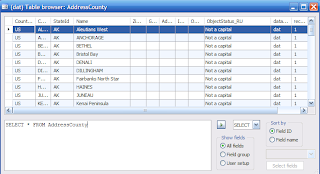
Today I provide you with another tool for Dynamics AX developers. It is a modified version of the SysTableBrowser (See picture 1).
Today I provide you with another tool for Dynamics AX developers. It is a modified version of the SysTableBrowser (See picture 1).
picture 1
Important:
After importing the project refresh the AOD (Tools\Development Tools\Application Objects\Refresh AOD)
Modifications:
- The table browser does not change its position when a different setup is selected. (Unlike standard system behavior in DAX 4.0)
- The AutoReport option was extended, and now you are able to select any of the table field groups (See Credits).
- Another selection option was added, providing the means to select any of the table fields to be shown in the grid. To do this, just press the ‘Select Fields’ button and select the fields you want displayed (See picture 2).
- Added a list of presets for the SQL window. (SELECT, UPDATE, DELETE). The list can be easily extended to include other presets you often use.
- Extra logic was added to the ExecuteSQL button, which executes the SQL string that the user has put into the SQL window. If it is a simple select (for example, generated by the SELECT preset), the ds query is executed instead of the sql string. This will bring back the sorting and filtering options that disappear after using the sql string query.
- Added the ability to sort columns by name or by id. In some cases (when, for example, you cannot find a specific field) it really helps out! (See picture 3)
picture 2
picture 3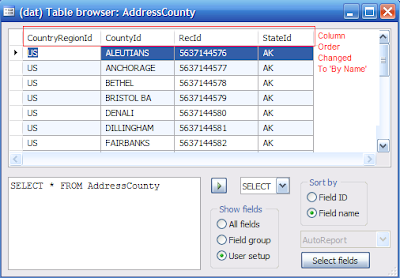
Possible future improvements:
- Add display methods of the selected table to the list of fields in the select dialog.
Credits:
The modification was inspired by a similar one performed by Nicolai Hillstrom for Dynamics AX 3.0. I moved it to DAX 4.0 and added some extra features I considered useful. One of them is implemented here (even thought I wasn’t able to download it and see how it is programmed).
Subscribe to:
Posts (Atom)