Thursday, April 19, 2007

Two very useful projects for DAX

1. DEV_FormControlInfo
Today I downloaded a very nice project for DAX 4.0 from www.axaptapedia.com
It inserts a number of lines of code into the SysSetupFormRun class, method task, providing a hotkey to access usefull information about any control on a form.

The hotkey is 'Ctrl + Q'.
Here is a screenshot of the result:

I moved the project to DAX 3.0, because I liked it a lot. Previously I used the Tabax button, which is convenient too, but does not provide as much info as posted above.

Here is the download link for the project:

2. DEV_AxFind


Also, my friend AndyD created a very good project for DAX 4.0

Description: After moving to DAX 4.0 a lot of users complained about the 'Ctrl + F' key combination. Now, instead of a 'Filter by Field' operation it opens a 'Global Search' window, which is uneasy to use so far.

Anyway, AndyD created a small dll file that replaces the 'Ctrl + K' key combination with the 'Ctrl + F' key combination, leaving the 'Global Serach' intact, but, at the same time, providing a well known interface for DAX users.

Thanks again, AndyD. :)

All you have to do is download the dll file (donwload link) and add the following lines of code into the Info class:

2.1. Info\\classDeclaration
classDeclaration
{
.....
DLL dllAxFind;
}

2.2. Info\\startupPost
void startupPost()
{
InteropPermission perm = new InteropPermission(InteropKind::DllInterop);
;

// DEV_AxFindReplacement Replace Keys F and K when used with the Ctrl key 19.04.2007 IKASH -->
perm.assert();
dllAxFind = new dll(@"D:\Install\Dynamics AX\Dynamics AX 4.0 SP1 EE\axfind.dll");
CodeAccessPermission::revertAssert();
// DEV_AxFindReplacement Replace Keys F and K when used with the Ctrl key 19.04.2007 IKASH <--
}

Notice, that the path to the DLL file, specified above, will be different - insert the correct path to the DLL file instead.

Reboot the DAX client. And you are done.

Friday, April 13, 2007

Buy MorphX IT in Russian

Now you can buy the MorphX IT (by Steen Andreasen) book about Dynamics AX Development in Russian language as well.

Please visit http://www.lulu.com/content/723888 to order the book now (Paperback or download versions available)

Also, there is a special offer for people living in Kiev, Ukraine and Moscow, Russia.
You can contact

  • Ivan Kashperuk to order a paperback copy of the book to be delivered to Kiev.
  • Mihail Rzevsky to order a paperback copy of the book to be delived to Moscow.
This is a very good offer, as you will save a lot on delivery costs and book price. Also, you can get it signed by the translator on location FOR FREE! :)
Also, you should understand, that this is simply about helping people to buy the book, it is not a commersial affair, as translators won't get any or very low revenues from this.

P.S. lulu.com also provides a review of the book and a free sample chapter preview.
P.P.S. You might have to wait for the delivery for some time, as orders are processed only after a certian quantity is collected.

Saturday, April 7, 2007

Add-On: Extended SysTableBrowser

Hello, readers.
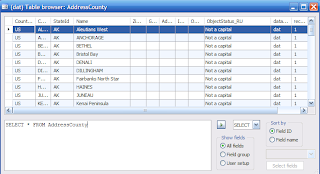
Today I provide you with another tool for Dynamics AX developers. It is a modified version of the SysTableBrowser (See picture 1).
picture 1


Important:
After importing the project refresh the AOD (Tools\Development Tools\Application Objects\Refresh AOD)

Modifications:

  1. The table browser does not change its position when a different setup is selected. (Unlike standard system behavior in DAX 4.0)

  2. The AutoReport option was extended, and now you are able to select any of the table field groups (See Credits).

  3. Another selection option was added, providing the means to select any of the table fields to be shown in the grid. To do this, just press the ‘Select Fields’ button and select the fields you want displayed (See picture 2).

  4. Added a list of presets for the SQL window. (SELECT, UPDATE, DELETE). The list can be easily extended to include other presets you often use.

  5. Extra logic was added to the ExecuteSQL button, which executes the SQL string that the user has put into the SQL window. If it is a simple select (for example, generated by the SELECT preset), the ds query is executed instead of the sql string. This will bring back the sorting and filtering options that disappear after using the sql string query.
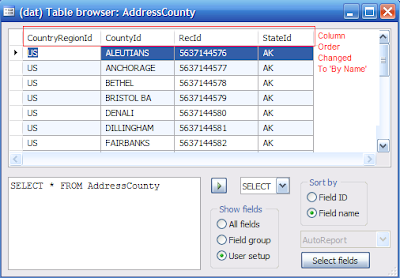
  6. Added the ability to sort columns by name or by id. In some cases (when, for example, you cannot find a specific field) it really helps out! (See picture 3)

picture 2
picture 3


Possible future improvements:

  1. Add display methods of the selected table to the list of fields in the select dialog.

Credits:


The modification was inspired by a similar one performed by Nicolai Hillstrom for Dynamics AX 3.0. I moved it to DAX 4.0 and added some extra features I considered useful. One of them is implemented here (even thought I wasn’t able to download it and see how it is programmed).

Wednesday, April 4, 2007

Should You Stay or Should You Go Now?

A comment from the last post asks a question that turned into such a long response on my part that I'll go ahead and post it:

why aren't you looking for a new exciting job in a lean and mini startup?

Fair question. First, I'm a very clumsy Pied Piping Mephistopheles in my attempts to get other people to leave. But, part of that is putting out what the reality of staying at Microsoft entails, and it's not pretty.

You're not going to get rich.

You're not going to be a L68+ Partner.

You're no longer going to succeed based on your merits alone.

Ouch, think that's uncool? Then my good-looking Brothers and Sisters, there are better places for you. Elsewhere.

I'm a corporate animal and this Microsoft environment, with its toxic pockets and issues, is a well known savage savanna to me and I'm able to succeed and be fulfilled, seeing the situation for what it is. And of course trying to change those things that I believe the other Microsofties can attempt to influence, given insight. The great potential for this change for the better is an exciting inspiration.

But I almost left recently. True. It was a situation where I didn't have to worry about sim-releasing in N-teen languages and ensuring that the Lords of IT were well and pleased. I could put out some cool features and IT-fanboys would suck-it-up and use whatever we made available to them and celebrate each newly released gizmo feature vs. crap all over the product and boo-hoo complain about all the compliance testing they had to do before moving to it. Tempting.

It did make me realize the accumulated shackles we haul around given the greater responsibility we have in creating World Class Software. No one else does it near the scope that Microsoft does. I don't know if we appreciate that deeply enough ourselves. Or appreciate it as a distinguishing, competitive feature. It certainly does not make you nimble and I've seen more than one feature killed due to localization and internationalization.

So, I stay because I still care. I care about making a difference for Microsoft products, and for carrying on the conversation here to see what other issues there are that should be brought out into the light and discussed, with the hopes of change for the better of Microsoft.

But Microsoft continues to bloat in size, the stock is flat, innovation is still somewhere out there, inspiring leadership is absent, executives seem to be flipping stock-grants, and efficiency and agility are still unrealized for many teams. The aircraft carrier hasn't turned very well yet, and the crew has become more and more dispassionate. I know my blue-badge clock is ticking and I hope I can make some difference before I head for the door and get to have fun writing EN-US Class Software.

All of us of deep software talent (and I'm putting myself in that group) are volunteers. We work where we work in a voluntarily sense because we enjoy it and it's the best place we can imagine for ourselves. We can pretty much get a job where-ever we want. Right now, for me, that's Microsoft. And there are changes happening. Slowly. But I think I've personally made the mistake of being anti-this and anti-that vs. being pro-this and pro-that. When you're anti-something and it gets attacked and then reduced, what takes its place? Whoops. Hadn't thought that one through. Maybe something worse than what was there. You've got to flip it around and be pro: pro-agility, pro-efficiency, pro-transparency, pro-compelling features, pro-iterative shipping, pro-stock growth, pro-meritocracy, pro pro pro.

I'm enjoying it while I can, and taking notes. I'm growing more in a business sense than a technical sense.

I can tell you this: I, like a lot of senior Microsofties, can't imagine staying for another year of flat stock growth. I'll have to be developing the bestest, funnest software in the world to live through another year of watching a stock price that meanders around like a fat, gassy contented cow from Carnation. I see this next year as the loyalty tipping point for Microsofties who have held on this long, hoping beyond hope for the shares to finally perform. If that doesn't happen, the office spacing problem around large of chunks of Microsoft will start to ease up without new buildings opening. And be wary of those who do stay, because you'll have to ask why.

So. You've had a chance to go through the MSPoll recently and perhaps consider how things are going for you. Why do you stay? Is it something beyond great benefits? What would compel you to stay for a long time, and what's on the verge of pushing you out the door?


Tuesday, April 3, 2007

A Whole Lotta Movin' On!

For a while, I'd post just about anytime someone I thought was a Big Cheese decided to move-on from Microsoft. For me, it was two things:

  1. A harbinger of change given some of the most loyal Microsofties who bleed multi-colored logos decide to pack it up, and
  2. Attrition is attrition - good, bad, or indifferent - and it was the right direction for company growth, no matter how influential the departed might be.

Then it just became too much to always note such partings. Lately, there's been more than one time I grumbled at someone to go check with That Architect or This PM Lead and they wander back to my office after a few minutes: "Who?"

I type the name into Outlook and get an error. Damn, I didn't think that they spelled their name funny or anything. So I find some random meeting with that person from the recent past and double click their name in the attendee list, and get a weirdly blank Outlook property dialog.

"Ohhhhhhh...," the realization hits me. "Huh. Sorry, I guess they've moved on." (I'll be damned!) "I'll track down who's handling their area now." (I'll be damned!)

Mr. Todd Bishop points out various interesting departures as of late and even further back:

Congratulations all! Again, I'll go for any attrition we can get. But are the right people leaving vs. the right people staying? There does come a point where you're left with a bunch of risk averse troops and no heroic generals. And I'm not quite sure what kind of uninspired, mediocre results you get, but at that point you've reached a point where you're back to destroying the village to save it.

Hey, Jackson Fish Market is hiring. As are lots, and lots of techies. And if you're interested in, say, the local Seattle scene, you should do what I do and go to events like Ignite Seattle (one's coming up this very Thursday, April 5th) so that you can get outside the Microsoft distortion bubble and talk with other techies regarding what they're doing and what they are passionate about.

It might be A Good Thing for you and your post MYCD-self. You can at least build your work network. That's a big first step.


Wednesday, March 28, 2007

My first attempts in Dynamics AX 4.0 SP1

Last week I started trying out what is Dynamics AX 4.0 SP1 European Version (Russian Localization included), creating a project for data import using ODBC connection (from an external SQL database).

In the process, I decided to take note of what I like in the new release, and also write down any bugs I find so that someone can send them over to Microsoft to be fixed.
(this is compared to Dynamics AX 3.0 SP3, but also tried out in Dynamics AX SP5 KR2)

Here is the small list I got so far:
New features:
  1. When pressing Enter to go to the next line in the X++ Code Editor window, the cursor is automatically positioned on the same column as the previous line. This was also present in DAX 3.0, but only after 2 lines are positioned in the same way (when adding a lot of conditions in the where clause, for example). But, there is a small 'bug' here. If you put the cursor at the end of a line of code, press Enter, the cursor will automatically get positioned under the line. Press Tab to indent one time. And then hit Enter again. The cursor is supposed to be directly under the line in the same column. But instead, it is position in the first column of the next line.
  2. When exporting any object to an .xpo file, the file gets a friendlier name, prefixed with the type of object that is being exported. For example, if you export the InventTable form, the file name would be 'Form_InventTable.xpo', which is pretty cool and helps to find the needed xpo file easier later.
  3. The Hot Keys for the Dynamics Debugger have been changed from F7, F8 to F10, F11. This is very inconvenient at first. And not just because you have to press different keys now. But because the F7 key actions were moved to F11, and F8 - to F10. By now I was used that the left key would take me deaper into the implementation. now it's vise versa.

And here is the bug list (some of them might have been fixed by now, or moved to the Known Issues, but I am unaware of this, sorry):

  1. The multiline comments are not colored correctly. The first slash is black, if the multiline comment spreads over more that one line. The rest of the comment is green, as it should be.
  2. In the table browser form, the UPDATE_RECORDSET command crashes Dynamics AX.
  3. After compiling a project, some of the tables in it are marked as DIRTY (red line near the name). This does not happen to all of the tables, but to those that it does, it happens all the time. Walkthrough: select a table in the AOT, compile it. (no changed done to the table). Then, compile the project. The previously selected table is marked in red. also, one of the tables in my project is always marked dirty after compilation.

That's all I have stumbled upon so far. And I am pretty sure more is to come. ;)

Tuesday, March 27, 2007

Extreme Results

Folks read MSFT Extreme Makeover, right?

Website: http://msftextrememakeover.blogspot.com/

Feeds: http://msftextrememakeover.blogspot.com/atom.xml and http://msftextrememakeover.blogspot.com/rss.xml (it's still the old Google Blogger so you're not date vexed if you read your RSS feeds in Outlook 2007).

Latest post: well worth a read (long like Sinofsky, not near as dense): MSFTextrememakeover For want of a shoe, or time for a new rider.